3 best ADHD calendar apps for visible time in 2026
Published on 9/27/2026

The best ADHD calendar app makes time visible and turns intended tasks into a day that can actually fit around your commitments. Chunk is the Mac pick in this comparison: it places tasks and synced Apple, Google and Outlook calendar events on one adjustable timeline. Ellie Planner is the flexible cross-platform planner, while Sunsama is the guided daily-planning choice.
Chunk is a time blocking app for Mac. You decide where work goes by dragging tasks beside existing commitments, then resize or move each block as the day changes. Its panel opens from the menu bar and can detach into a normal resizable window, but the important distinction is not where it opens. It is that your tasks, calendar context and planned time share the same workspace.
This guide stays calendar-specific. It compares how each app helps you see available time, commit tasks to realistic slots and recover when a plan slips. If your main difficulty is understanding why an hour disappears or why a long task feels impossible to place, start with the guide to ADHD time blindness.
Which ADHD calendar app is best for making time visible?
Chunk is the best fit in this list if you plan on a Mac and want direct control over a visual day. Its Schedule mode shows day, week, month and list views, while Tasks mode keeps the work you intend to schedule close to the calendar. You can drag a task onto the timeline, assign a duration and adjust the resulting block when your estimate changes.
Choose Ellie Planner if you need your planning workspace across Mac, Windows, the web, iPhone and iPad. Choose Sunsama if a guided daily ritual is more useful to you than a lighter, direct scheduling workflow. Its broad platform coverage also suits a routine that moves between desktop, web and mobile devices.
No calendar can decide which visual style will hold your attention. Test each option with a real day containing appointments, uncertain task lengths and at least one interruption. The best ADHD calendar planner is the one that lets you correct the plan without making that correction feel like another project.
Chunk
Chunk is best for placing tasks beside real calendar commitments as adjustable blocks on a Mac. It suits you if visible time, quick manual changes and two-way Apple, Google or Outlook calendar sync matter more than automatic scheduling.
The app also shows a live countdown for the current block and can keep a small floating timer visible while you work. After a seven-day trial, direct licences are available as a one-time Lifetime purchase for $29.99 or a Family purchase for $59.99.
Ellie Planner
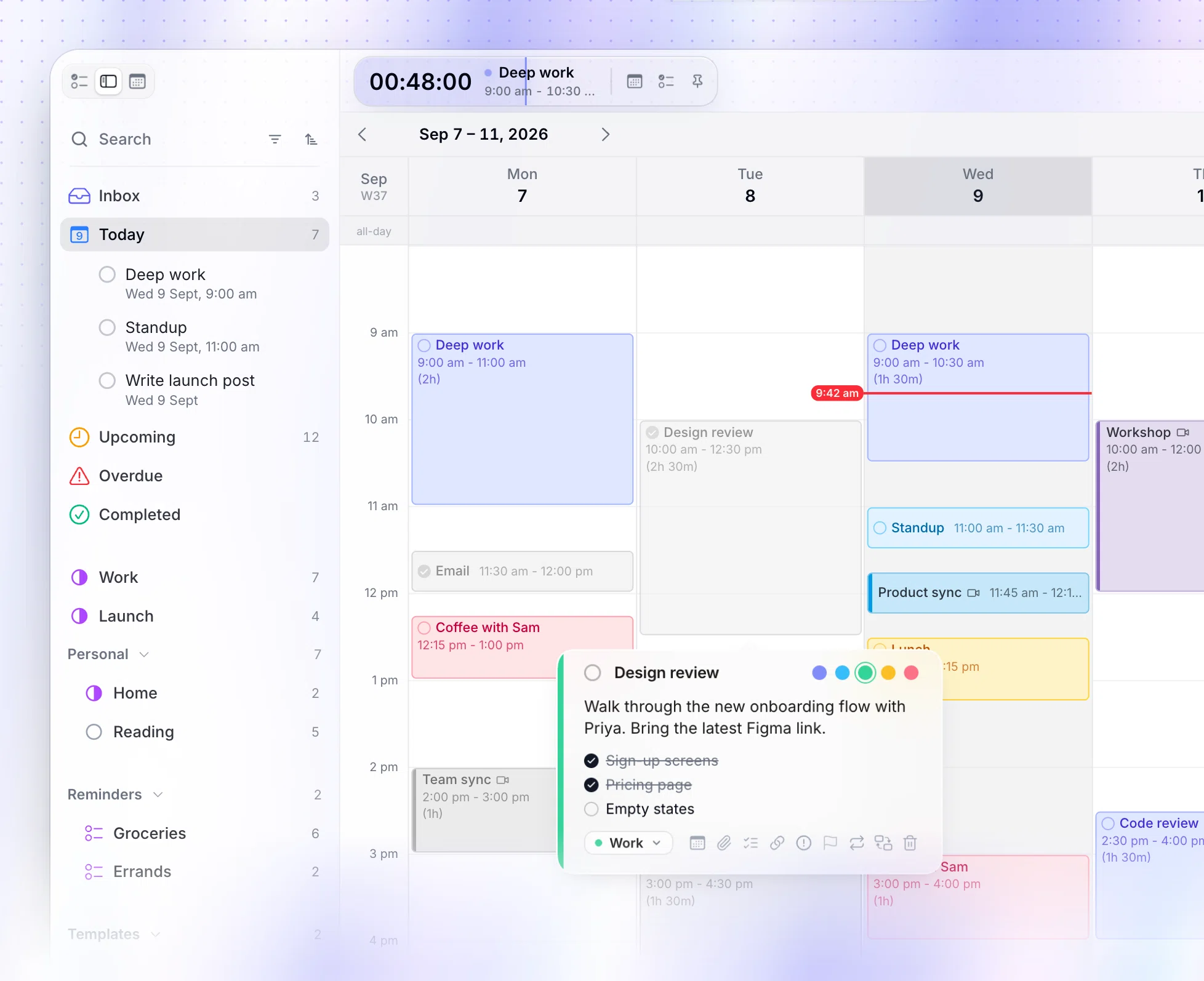
Ellie Planner is best if you want a tasks-and-calendar planning workflow across several platforms. It runs on Mac, Windows, the web, iPhone and iPad, so your choice is not tied to one desktop.
Its verified pricing is $9.99 per month or $299.99 as a one-time purchase. That makes it worth comparing carefully with how often you will use its broader platform coverage.
Sunsama
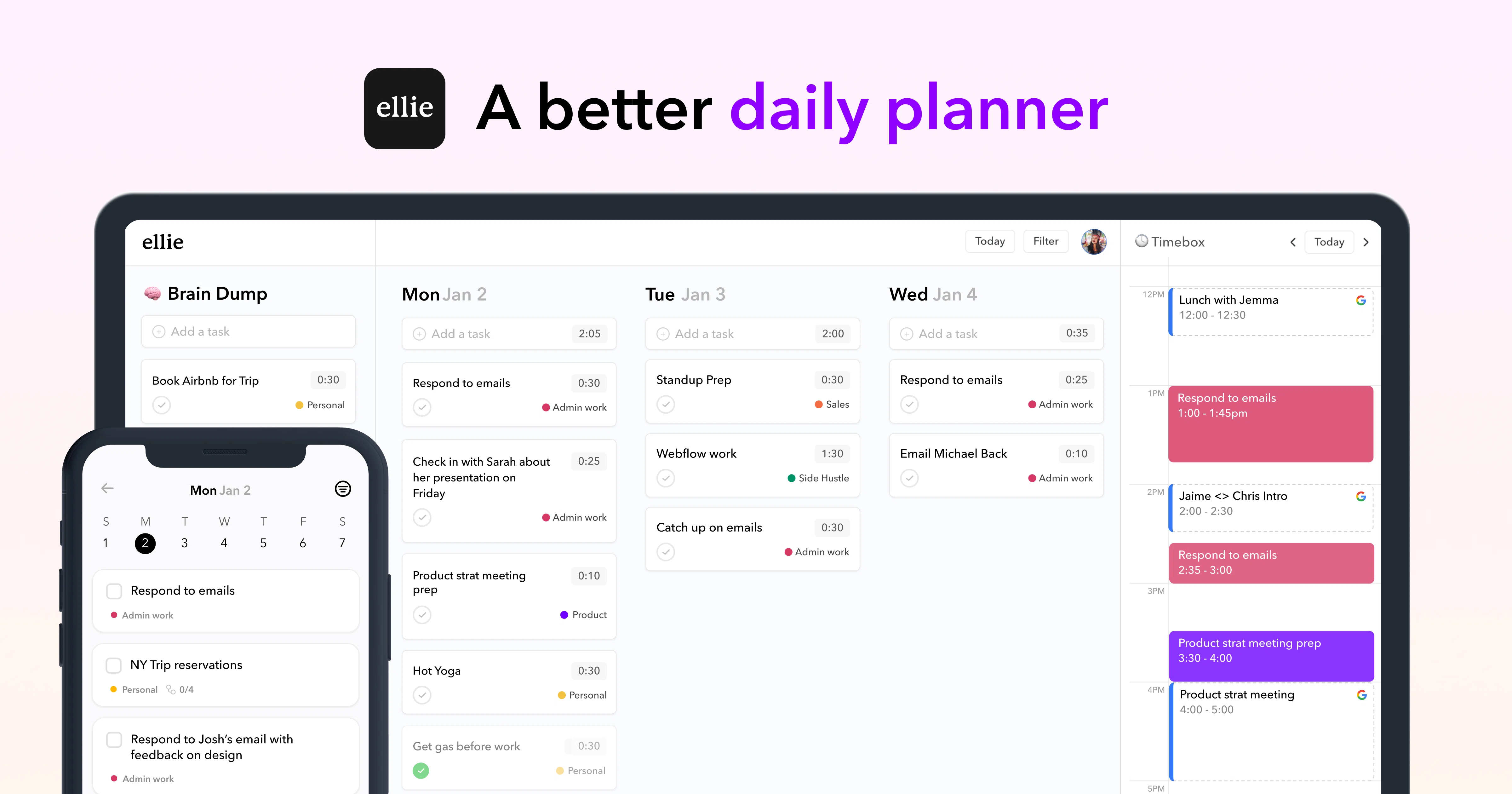
Sunsama is best if you want a deliberate daily-planning routine rather than a calendar you simply open and edit. Its guided approach can help you pause, select the day’s work and build a more intentional schedule.
It is available on web, macOS, Windows, Linux, iOS, iPadOS and Android. Verified pricing is $25 per month or $20 per month when billed yearly.
How does a visual calendar help with ADHD time blindness?
A visual calendar converts abstract intentions into visible claims on limited space. “Write report” has no obvious size in a task list. A 90-minute block beside a meeting and lunch shows immediately whether the task fits, whether it needs to be split or whether another commitment must move.
This matters because a to-do list can hide duration and transition costs. Ten tasks may look manageable as ten lines, even when they require twelve hours. A timeline exposes that mismatch before the day begins. It also provides an external answer to “what should I be doing now?” because the current block occupies a defined place rather than competing with every unfinished item.
Colour can make categories easier to scan, but too many labels create another system to maintain. Chunk limits its task blocks to Indigo, Sky, Emerald, Amber and Rose. A simple scheme might use one colour for focused work, one for administration and one for personal commitments, while leaving the remaining colours unused until you have a clear reason for them.
A visual schedule is not a promise that every estimate will be right. Its value is feedback. If a task repeatedly needs twice the planned time, the calendar gives you evidence for the next estimate. The guide to choosing ADHD time-block lengths explains how to begin with blocks you can adjust rather than idealised sessions.
What should you look for in an ADHD calendar planner?
Start with one test: can the app show intended work beside fixed commitments? A calendar full of meetings is incomplete if the tasks between them remain in a separate list. A task manager is equally incomplete for daily planning if it cannot show that two hours of work will not fit into a 40-minute gap.
Next, check how much effort it takes to revise the schedule. Plans change, especially when starting takes longer than expected or an interruption consumes a block. You should be able to move or resize work without rebuilding the day. Chunk supports direct movement and resizing on its timeline, and unfinished work can be completed, rescheduled or returned to a task list rather than silently disappearing.
A visible timeline: you can see duration, gaps and overlaps rather than relying on a list of times.
Tasks beside commitments: intended work and calendar events compete for the same hours.
Easy replanning: moving one block does not require rewriting the whole day.
Several useful views: the day supports action, while week and month views support orientation.
A clear current cue: a countdown, current-time marker or active block reduces repeated clock checking.
Suitable platform coverage: the app runs where you genuinely plan, not merely where you occasionally check a date.
Avoid judging an ADHD planner app by the length of its feature list. Every extra inbox, tag or dashboard can become another location to check. Your selection should reduce the distance between choosing a task and giving it a realistic place in the day.
How do you plan your day with ADHD on a Mac?
Begin with calendar commitments because they already own time. In Chunk, connect the Apple, Google or Outlook calendars that contain the events you need to respect. The app supports multiple Google and Outlook accounts alongside Apple Calendar, so work and personal commitments can appear in the same planning context without requiring you to copy them into a new calendar.
Then choose a small set of tasks for today. Place each task into an open part of the timeline and use a duration based on prior experience rather than hope. If starting is the main obstacle, the advice in how to start tasks with ADHD can help you define a smaller first action before scheduling it.
Add breathing room around demanding blocks. A schedule packed edge to edge assumes immediate transitions and perfect estimates. A gap can absorb an overrun, a drink, a short walk or the few minutes needed to reorient after a meeting. This is capacity planning, not wasted time.
Once the day begins, follow the current block rather than reopening the entire task list whenever attention shifts. Chunk shows a countdown in the Mac menu bar, and an optional floating mini timer can remain visible over your workspace. If your current plan stops matching reality, move the next block or reduce its scope. A revised schedule is more useful than an untouched schedule that became fictional at 10:30.
Should your calendar schedule tasks automatically?
Automatic scheduling and manual time blocking solve different problems. Automation can reduce the effort of placing tasks, while manual planning keeps you involved in deciding what deserves the limited space. If you regularly abandon a plan because it does not reflect your energy, task resistance or preferred sequence, direct placement may give you better information.
Chunk uses a user-directed model. You place and adjust blocks yourself. If you connect Claude through Chunk’s local MCP server, Claude does what you ask with your local schedule and tasks; it does not take ownership of the plan. That distinction is useful when you want assistance creating a draft while retaining the final decision about every block.
A guided planner such as Sunsama sits elsewhere on the spectrum. Its strength is the ritual around deciding what belongs in the day. That may suit you when the hardest part is slowing down and selecting a realistic workload. Ellie Planner is the broader-platform option when access across desktop, web and Apple mobile devices carries more weight.
Do not choose automation simply because planning feels difficult on a bad day. First test whether a smaller planning routine helps: fixed events, three priority tasks, honest durations and one buffer. The broader ADHD time-blocking guide covers how to keep that routine light enough to repeat.
How can you keep an ADHD calendar from becoming overwhelming?
Use the calendar for decisions that need time, not as a storage place for every possible task. Keep unscheduled ideas in a task list, then move only today’s candidates onto the timeline. This preserves the distinction between work you could do and work you have made room to do.
Limit the number of planning rules. You do not need a colour for every project, a perfect category system or a minute-by-minute day. Begin with fixed events, focused work, small administration tasks and buffers. Add a distinction only when it answers a recurring question faster.
Reusable structure can also reduce setup. Chunk includes template lists and routines that can place a saved set of task blocks onto matching days. A template can provide the shape of a workday without forcing every Tuesday to unfold identically. You can still move, resize or skip what does not fit.
Finally, review misses without turning them into a character judgement. An unfinished block tells you that the duration, timing, task size or surrounding context was wrong. Chunk keeps ended incomplete work visible in Today so you can complete it, reschedule it or return it to its list. For a wider selection of tools that support different parts of this process, see the guide to the best Mac apps for ADHD.
Which ADHD calendar app should you choose?
Choose Chunk if your central problem is turning tasks into a visible, adjustable day on a Mac. It brings tasks and external calendar commitments together, lets you schedule by dragging onto a timeline and keeps the current block close while you work. Apple, Google and Outlook calendar events can sync both ways, which makes the plan part of your real calendar workflow rather than a separate mock schedule.
Choose Ellie Planner when platform breadth is essential. Its Mac, Windows, web, iPhone and iPad availability gives you more places to access the same planning tool. The one-time purchase option also gives you an alternative to its monthly plan, although the verified lifetime price is substantially higher than Chunk’s direct Lifetime licence.
Choose Sunsama when guided daily planning is the feature you are most likely to use consistently. Its desktop, web and mobile coverage is the broadest of these options, and its subscription supports a daily-planning approach rather than a pay-once Mac workflow.
If you are on a Mac, test the actual job rather than an empty demo. Connect the calendars that shape your day, add three tasks with honest durations and move one when the plan changes. Chunk’s seven-day trial lets you run that test before buying. You can also compare its full planning workflow on the time blocking app for Mac page.
Chunk vs the field.
A quick side-by-side. We kept it honest — Chunk isn't the right fit for everyone, and that's fine.
Chunk
This is usPricing reflects each tool's lowest-tier individual plan at time of writing. Check the source for current numbers.
Related articles


How to start tasks with ADHD when willpower isn't the answer
How to start tasks with ADHD when willpower isn't the answer
Time blocking with ADHD: how long should each block actually be?
Time blocking with ADHD: how long should each block actually be?