5 Sunsama Alternatives for Mac (2026): Cheaper, Native or Free
Published on 5/10/2026


The best Sunsama alternative depends on whether you prioritise manual task consolidation, automatic scheduling, calendar planning or a lower price. The five options reviewed here are Chunk, Fantastical, Akiflow, Morgen and Motion, each of which suits a different workflow.
But Sunsama is not for everyone. The price stings if you are paying out of pocket. For a Mac user who wants a flat upfront cost, the gap is real.
This guide compares five alternatives that each solve a different slice of the Sunsama problem: Chunk, Fantastical, Akiflow, Morgen, and Motion. None of them is a Sunsama clone. Each picks a different opinion about how planning should feel.
Why look for a Sunsama alternative?
Most people start hunting for a Sunsama replacement after one of three frictions. The first is price. According to Sunsama's pricing page, Sunsama is $22 a month on monthly billing or $20 a month when billed yearly, with no lifetime tier. The maths gets harder when you already pay for Notion, Things, or Todoist alongside it.
The second is the Mac feel. Sunsama's pricing page lists macOS among its supported platforms. There is no menu-bar presence, no integration with Apple Reminders, and no panel that floats above a fullscreen Xcode or Figma window. If you spend your day on macOS, that gap is noticeable.
The third is workflow fit. Sunsama leans hard on its daily-planning ritual and weekly review. Some people love that pacing. Others want a planner that gets out of the way, or one that schedules tasks for them, or one that lives entirely in the keyboard. Sunsama has one opinion about how to plan a day, and if your brain runs on a different model, fighting the app gets old.
What a Sunsama alternative for Mac needs to do
A Sunsama alternative for Mac needs a responsive interface, useful calendar connections and quick access to your plan without disrupting your work.
A responsive interface with proper dark-mode support.
A menu-bar presence so you can see what you are meant to be doing without bringing a window forward.
Two-way calendar sync with Google, Outlook, and Apple Calendar so events created in either place stay in step.
Apple Reminders integration, since that is where most Mac users already park ad hoc tasks.
Local data storage where possible, so the app stays fast and your schedule does not depend on someone else's server uptime.
Most of the apps below clear some of those bars, while the right choice depends on which ones matter to you. For a deeper take on the platform-fit question, see our roundup of the best time blocking apps for Mac.
Chunk: a one-time-licence time blocking app for Mac
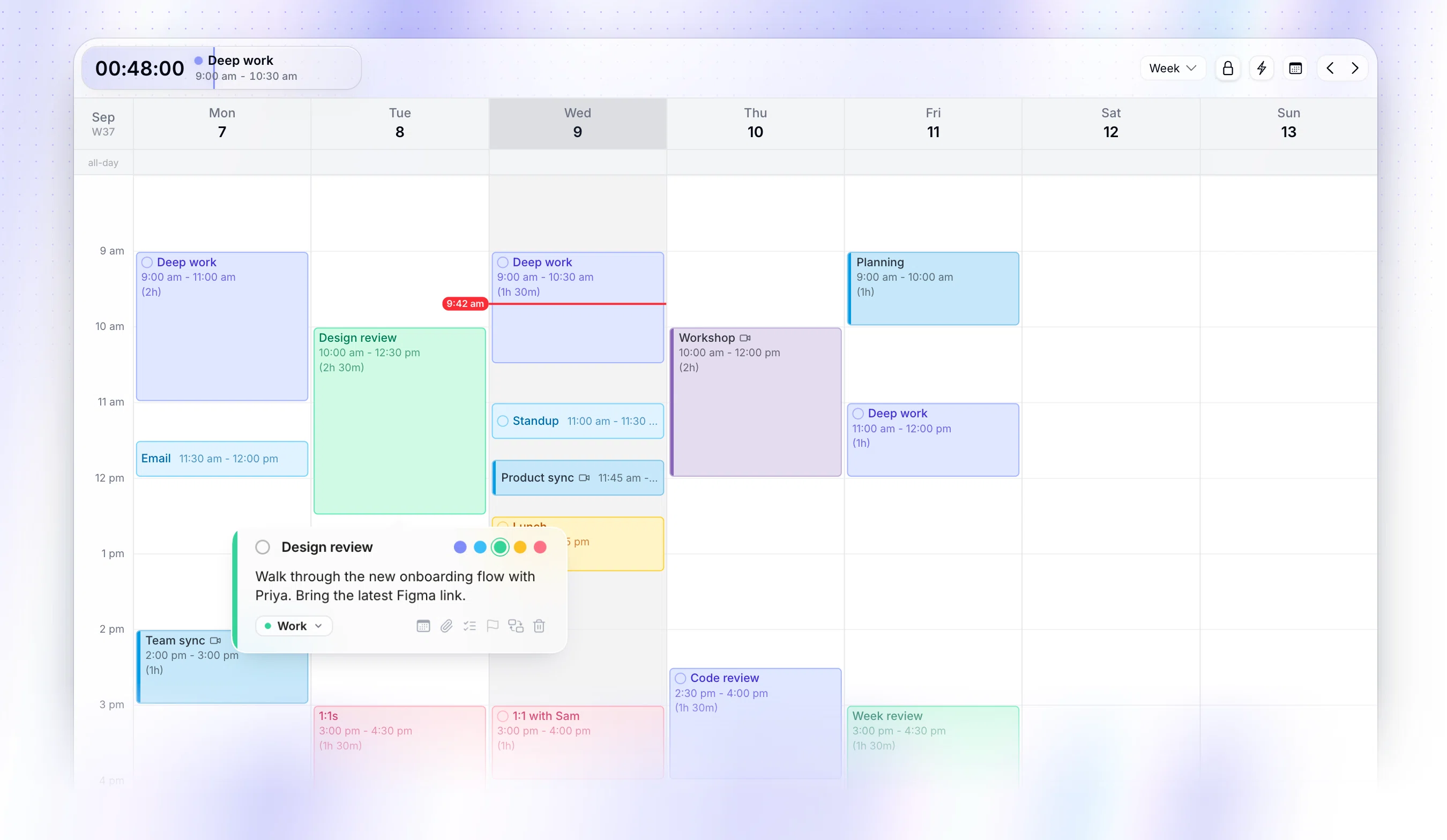
Chunk is the closest answer to "Sunsama, but built for macOS and one-time". It is macOS only (Apple Silicon and Intel) and lives in the menu bar with a live countdown to your next block. There is no subscription. After a 7-day free trial you pay once and own the app.
The interaction model is dragging. You drag a task from your list onto a vertical timeline, set its length, and pick one of five block colours: Indigo, Sky, Emerald, Amber, or Rose. The planner panel floats above fullscreen apps. You can plan a block while staring at the Figma file you are about to work on, without alt-tabbing or losing focus.
Two-way sync covers Google, Outlook, and Apple Calendar. Apple Reminders feed straight into your task list. Day templates and weekday routines mean a recurring Tuesday gets planned in two clicks. There is also a local Claude MCP server, which lets your own Claude instance edit your schedule. That is a different thing from Motion-style auto-AI: you stay in control, Claude is just another way to push tasks onto the day.
Chunk is single-user and Mac-only. If you need a Windows build, or you want to share a planner with a teammate, this is not the right tool. For everyone else on macOS, the menu-bar workflow is the wedge. The menu-bar feature deep-dive walks through the panel behaviour in more detail.
Fantastical: an Apple-native calendar viewer (not a planner)
Fantastical is the most Apple-feeling app on this list. According to Flexibits' Fantastical plans page, it runs on Mac, iPhone, iPad, Apple Watch, Apple Vision Pro and Windows. The design language matches macOS perfectly. Fantastical has a free tier, while its Individual plan is $6.99 a month or $56.99 a year ($4.75 a month when billed yearly), as listed in the verified Fantastical pricing result.
The catch: Fantastical is a calendar, not a planner. It shows you what is on your schedule. It does not give you a task list to drag onto a timeline, it does not have a daily-planning ritual, and it does not nudge you toward time blocking. You can create events and treat each one as a block, but that is a workaround, not the workflow.
Pick Fantastical if your problem is "I need a better calendar viewer across my Apple devices". Skip it if your problem is "I need a Sunsama-style planner". The two jobs overlap less than the marketing suggests.
Akiflow: a keyboard-driven task consolidator
Akiflow's pitch is consolidation. It pulls tasks from Slack, Gmail, Asana, Notion, Trello, Linear, and a long list of other tools into one inbox, and gives you a fast keyboard interface for slotting them onto a calendar. The command bar is the centre of gravity. Almost every action has a shortcut.
According to Akiflow's pricing page, pricing is $34 a month or $19 a month when billed yearly. Two-way sync covers Google and Outlook. The Mac app is Electron, so it does not feel native, but the keyboard-first design hides that better than most. Akiflow's download page lists macOS, Windows, web, tablet, iOS and Android support. If you spend your day in the terminal and you live and die by shortcuts, Akiflow's command bar is genuinely fast.
Where it loses ground against Sunsama is the planning ritual. Akiflow is great at processing inbound noise. It is less opinionated about how a day should be shaped. If you wanted Sunsama because of the daily ritual, Akiflow will feel chillier. If you wanted Sunsama because it consolidates inputs from twelve different tools, Akiflow does that part better.
Morgen: a cross-platform calendar warrior's option
Morgen is the broadest-platform option here. Morgen's pricing and platform page lists Windows, macOS, Linux, web, iOS and Android. If you are the rare person who works on Linux during the week and Android on the weekend, Morgen is one of the very few planners that follows you everywhere.
The pricing is $30 a month or $15 a month when billed yearly, according to the verified Morgen pricing result. The interface is calendar-heavy, with a task panel on the side that you drag onto the timeline. There is some automation around scheduling, though it is rule-based rather than fully AI-driven.
The trade-off is the same as Akiflow: cross-platform reach means the Mac version cannot lean into Mac-only frills like menu-bar panels or panels that remain above fullscreen windows. If you genuinely need to plan from a Linux laptop, Morgen wins by default. If you live on macOS and you only opened this guide because Sunsama feels heavy, Morgen will not feel meaningfully lighter.
Motion: hands-off AI auto-scheduling
Motion sits at the opposite end of the planning spectrum from Chunk. You give Motion a list of tasks with deadlines and durations, and the AI lays them onto your calendar automatically. When meetings move, tasks reshuffle. The promise is that you stop planning and just review what Motion produced.
Motion's pricing is tiered by plan, seat, and AI-credit allowance. According to Motion's pricing page, Pro AI costs $19 per seat per month when billed annually, while Business AI costs $29 per seat per month when billed annually. A card is required up front to start the trial. Two-way sync covers Google and Outlook. Motion's download page lists macOS, Windows, web, iOS and Android.
Motion is the right choice if you genuinely want to outsource scheduling decisions. It is the wrong choice if you want to feel in control of your day. Many time-blocking enthusiasts try Motion, find that the AI keeps reshuffling work they had mentally committed to a specific hour, and leave. Compare that with Chunk, where you place every block yourself, and the philosophical gap becomes obvious. Worth reading our take on why time blocking beats todo lists before picking sides.
If you want a free Sunsama alternative
"Sunsama alternative" and "free Sunsama alternative" are two different searches, so this one deserves a straight answer. Nothing here replicates Sunsama's full daily-planning ritual for nothing. A guided shutdown, a calendar-first view, and consolidation from a dozen other tools is what you're paying for. But if all you want is to block time on a calendar without handing anyone money, a few options get you most of the way there.
Google Calendar is free and lets you drag events straight onto a day, which is manual time blocking in its rawest form. There's no task list, no drag-from-inbox step, and no planning ritual. You build every block by hand.
Notion Calendar is free and pairs a task sidebar with the calendar view, so dragging a task into a slot feels closer to Sunsama's flow. It has no daily shutdown ritual and no dedicated planning mode, so the structure is on you.
Apple Calendar and Reminders are free, built into macOS, and sync quietly across your devices. Time blocking with them means creating a calendar event for each block and checking Reminders separately, since nothing bridges the two automatically.
Sunsama's own free trial runs 14 days with no card required, which is the most honest way to find out whether the ritual is worth paying for before you commit to it.
None of these fully replace Sunsama. They're free tools that cover pieces of the job, not the whole ritual. If you want dedicated time blocking on Mac without a recurring bill, Chunk is the closest fit: not free, but a single purchase instead of a subscription. It's a time blocking app for Mac built around dragging tasks onto a timeline, with the free trial there to let you try it before you pay.
Which Sunsama alternative is right for you?
The right alternative depends on which part of Sunsama you wanted to keep and which part you wanted to leave behind.
You want a Mac-only app, menu-bar presence, and a one-time licence: Chunk.
You want the best calendar viewer on Apple devices, and you do not need a planner: Fantastical.
You want the fastest keyboard interface for processing tasks from many sources: Akiflow.
You need to plan from Mac, Windows, and Linux in the same week: Morgen.
You want to hand scheduling over to an AI and stop thinking about it: Motion.
If you have ADHD or struggle with task initiation, the ADHD-specific guide goes deeper on which features matter and why. For a wider Mac context, the 2026 macOS productivity roundup places these planners alongside note-taking, focus, and writing tools. And if you want the methodology underneath any of these apps, our deep-work time blocking guide covers the practice.
If those numbers ring true and the one-time-licence path appeals, the Chunk free trial is the cheapest way to test the workflow against Sunsama's before either subscription renews.
Chunk vs the field.
A quick side-by-side. We kept it honest — Chunk isn't the right fit for everyone, and that's fine.
Chunk
This is usPricing reflects each tool's lowest-tier individual plan at time of writing. Check the source for current numbers.


.webp)